


Introduction
Welcome to Frogo. One Leap Ahead of Every Threat.
This documentation hub serves as the central API reference for integrating with Frogo’s anti-fraud platform. It provides developers and partners with schemas, event specifications, and technical integration details.
Overall
The Frogo Device Fingerprint Solution enables partners to collect, identify, and analyze device intelligence data through a lightweight JavaScript integration.
Partners have full control over the integration scope and may choose on which pages the fingerprint client should be executed based on their business needs and risk strategy.
Once integrated, the fp.js collects device, browser, network, and behavioral attributes and generates a unique device identifier. The collected fingerprint data is processed by the Frogo platform after it is submitted. The fingerprint data is collected automatically and sent manually by a Partner. Instead, data submission is explicitly initiated by a Partner through the window.aft.send() function, providing full control over when data is sent to Frogo. Upon successful submission, the system returns a requestID and deviceID. The requestID can subsequently be used to retrieve enriched fingerprint data through Frogo REST API by including it in the corresponding API request.
After successful transmission, Frogo processes the collected information and makes it available through REST API endpoints. Partners can retrieve detailed device intelligence data for further analysis and decision-making.
The solution provides:
- Flexible placement of fp.js on partner-defined pages.
- Collection of device, browser, network, and environment attributes.
- Retrieval of fingerprint data through REST APIs.
Terminology
| Term | Description |
|---|---|
| Digital Customer Platform | A client application that is integrated with Frogo solution. |
| Frogo | Complex solution landscape that is responsible for detecting and fraud management. |
| Standalone Device Fingerprint Solution | A standalone Frogo solution that enables partners to collect, manage, and analyze device data through device fingerprint technology. The solution generates a unique device identifier and provides access to enriched data via REST API requests. |
| fp.js | A script provided by Frogo that enables device fingerprint collection. The script generates a device identifier. |
Integration Scopes
The integration schema defines the structure, data flow, and interaction logic between Frogo and External Partner Systems.
Standalone Device Fingerprint Solution Schema
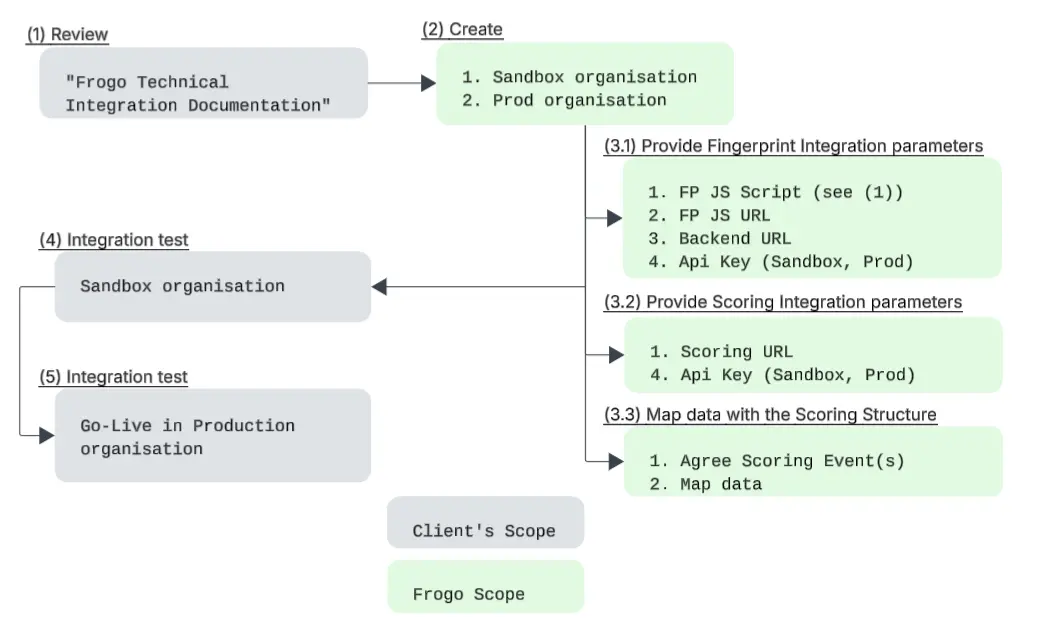
Integration Steps
- During the integration phase, Frogo provides a JavaScript fingerprint client (fp.js) that must be placed inside the fp.js section of each relevant HTML page on the partner platform. The script initializes the device fingerprinting process and enables communication with the Frogo Anti-Fraud platform.
- The fingerprint client script URL is generated using the following components: BASE_URL, UUID, and FILE_TYPE parameters. The UUID is generated in the Frogo Backoffice and uniquely identifies the integration instance.
- To retrieve the current fingerprint session identifier, the following JavaScript method should be used:const sessionId = await window.aft.sid(10000); The function returns the current session ID when it becomes available.
- The fingerprint data should be explicitly sent to the Frogo platform using the following API method: await window.aft.send(); The method returns device_id and request_id that is needed for REST API request (see № 8 this list) if the fingerprint was successfully transmitted and false if the operation failed or timed out.The window.aft.send() method can be called from anywhere on the page.
Note! Each call to window.aft.send() is billable and is charged to the client as a separate request.
- Since the fingerprint client library is loaded asynchronously, partners should implement a waiting mechanism to ensure that the window.aft object and its methods are fully initialized before invoking any API functions.
- Fingerprint data can be retrieved using the following API endpoint: GET /partners/stats/{request_id} This endpoint allows the partner to obtain fingerprint-related data by passing the request_id returned by the window.aft.send() method (see statement 6 above).
Note! Calls to this endpoint are not billable and are not charged to the client.
- The request requires the following parameters:
• request_id — required path parameter.
• ak — query parameter. Partner backend API key used for authorization. - If the request is processed successfully, the API returns response code 200 with fingerprint data , including browser, operating system, device, session, IP, localization, and risk-related indicators.
200 Success response
{
  "ok": true,
  "data": {
    "D9tysGh2": "6a2bbdb272394dddf5bae119",  //device_id
    "Rq8WzNxL": "b6757872-0f6c-4cc1-bac7-f388dc74a4b9",  // request_id
    "signature": "42a807ed8620f38ef9eb355d794b65b7deb230f81bf12a5faef294be775d80d0"
  },
}- The successful response may include the following fingerprint data fields, see example:
Response Signals
The following table provides a detailed reference for all fields returned in the JSON response payload for GET /partners/stats/{request_id} (see the method description above). The fields are categorized by their purpose, including identification, environmental metadata, and security anomaly detection.
| Field Name | Type | Description |
|---|---|---|
| Triggered when user behaviour within single FP shows unrealistic or suspicious patterns. | ||
| Triggered if automation tools or bots are detected. | ||
| The name of the web browser used for the request (e.g., "Chrome", "Firefox"). | ||
| The version number of the browser detected. | ||
| Triggered if there was device_id with the same browser_id. | ||
| Unique identifier used to track the user across different browser environments on the same device. | ||
| Triggered when web development tools or consoles are opened. | ||
| Hardware-based persistent identifier for the physical device. | ||
| Triggered when part of fingerprint browser signals is blocked or disabled indicating evasion of fingerprint collection. | ||
| Triggered when keystroke shows unrealistic patterns or if inconsistent keyboard parameters are found. | ||
| Two-letter ISO country code associated with the client IP address. | ||
| The full name of the country associated with the client IP address. | ||
| Triggered when IP manipulation is detected. | ||
| Triggered if automation tools or bots are detected. | ||
| The language setting of the user's browser or device. | ||
| Triggered when Inconsistency between environmental parameters is found. | ||
| Triggered when unrealistic network patterns are found. | ||
| The operating system name (e.g., "Windows", "macOS", "iOS"). | ||
| The version of the operating system. | ||
| A unique identifier for the partner integrating the API. | ||
| Triggered when private mode is detected. | ||
| Triggered when Remote Desktop Programs are detected. | ||
| The resolution of the user's screen. | ||
| Unique identifier for the current user session. | ||
| Triggered when payload or fingerprint data was manipulated directly at the moment of data collection. | ||
| Triggered when device/browser has inappropriate signals or parameters. | ||
| The actual IP address of the client. | ||
| The Internet Service Provider (ISP) detected the client IP. | ||
| The time zone is offset from UTC in minutes. | ||
| The full User-Agent string reported by the browser. | ||
| Triggered when Virtual Machine is detected. | ||
| Indicates if a Virtual Private Network (VPN) connection is actively detected for the request. |
200 Success response
{
  "data": {
    "ab": true,
    "bot": true,
    "browser_name": "string",
    "browser_ver": "string",
    "collision": true,
    "cross_browser_id": "string",
    "dev_tools": true,
    "device_id": "string",
    "fp_evasion": true,
    "input_anomaly": true,
    "ip_country_code": "string",
    "ip_country_name": "string",
    "ip_manipulation": true,
    "is_bot": true,
    "lang": "string",
    "locale_manipulation": true,
    "net_anomaly": true,
    "os_name": "string",
    "os_ver": "string",
    "partner_id": "string",
    "private_mode": true,
    "rdp": true,
    "request_id": "string",
    "screen_res": "string",
    "session_id": "string",
    "spoofing": true,
    "tampering": true,
    "true_ip": "string",
    "true_isp": "string",
    "tz": 0,
    "user_agent": "string",
    "vm": true,
    "vpn": true
  },
  "error": {
    "code": 0,
    "message": "string"
  },
  "ok": true,
  "pagination": {
    "page": 0,
    "pages": 0,
    "per_page": 0,
    "total": 0
  }
}
Error codes
This section describes the most common error responses that can be returned by the API. Each error code indicates a specific type of issue encountered while processing a request, helping clients quickly identify and resolve problems during integration.
- 400 Bad Request
The request is malformed or contains invalid parameters. Please verify the request syntax and required fields. - 401 Authorization Error
Authentication failed or is missing. Ensure that valid authorization credentials are provided. - 404 Stats Not Found
The requested statistics could not be found. Verify that the specified resource, identifier, or requested data exists. - 500 Server Error
An unexpected error occurred on the server while processing the request. Retry the request later or contact support if the issue persists.
Example Device Fingerprint Client Integration Script
fp.js Template
<script
    src="https://[BASE_URL]/v2/i/[UUID].js?[FILE_TYPE]"
    type="module"
    async
></script>
fp.js for Sandbox
<script
    src="https://f.dev.r1695.frogo-aft.tech/v2/i/{key}.js?file=i"
    type="module"
    async
></script>
fp.js for Prod
<script
    src="https://s.r1695.frogo-aft.tech/v2/i/{key}.js?file=i"
    type="module"
    async
></script>{
"data": "string",
"error": {
"code": 0,
"message": "string"
},
"ok": true,
"pagination": {
"page": 0,
"pages": 0,
"per_page": 0,
"total": 0
}
}{
"data": "string",
"error": {
"code": 0,
"message": "string"
},
"ok": true,
"pagination": {
"page": 0,
"pages": 0,
"per_page": 0,
"total": 0
}
}{
"data": "string",
"error": {
"code": 0,
"message": "string"
},
"ok": true,
"pagination": {
"page": 0,
"pages": 0,
"per_page": 0,
"total": 0
}
}{
"data": "string",
"error": {
"code": 0,
"message": "string"
},
"ok": true,
"pagination": {
"page": 0,
"pages": 0,
"per_page": 0,
"total": 0
}
}